
Your financial data, inside RunwayCal in minutes.
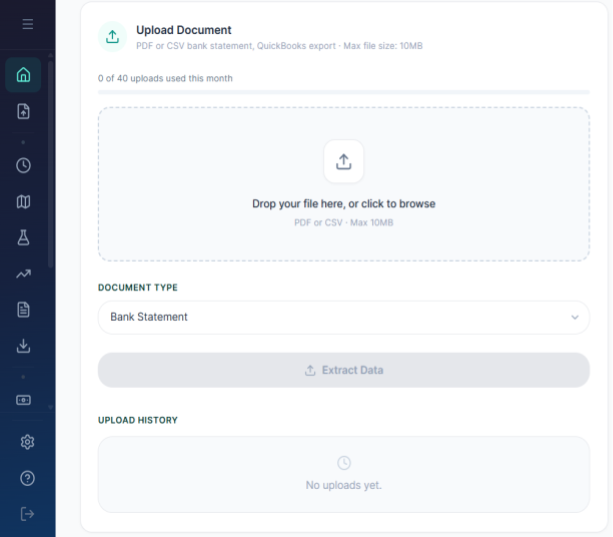
Upload a bank statement, invoice, QuickBooks export, or payroll report. AI scans the document and extracts structured data. You review every item and approve before anything enters your model. AI suggests, founder approves.
- PDF + CSV support
- AI extraction
- User approval
- Two-tier cache
AI extracts. You approve. Nothing enters without your sign-off.
RunwayCal uses AI to read bank statements, but every extracted item requires your explicit approval. Your financial model stays deterministic.
Upload PDF/CSV
Drop your bank statement
AI Extracts
Line items identified and categorized
Review & Approve
Accept, modify, or reject each item
How ingestion works
Document Extraction
Upload bank statements, invoices, QuickBooks exports, or payroll reports in PDF or CSV format. AI identifies transactions, categorizes them, and suggests mappings to RunwayCal modules. International format support covers US, EU, IN, UK, AU, CA, and multi-currency documents.
AI Suggests, Founder Approves
Every extracted item shows vendor name, amount, suggested category, and module mapping. Accept, modify, or reject each line. Nothing enters your model without your explicit confirmation. One-click approve all for trusted uploads, or review item by item for full control.
Intelligence Cache
Two-tier caching learns your patterns. A global vendor cache handles 168 common SaaS tools instantly. Your org-specific cache learns from your approvals. By your third monthly upload, most vendors are instant matches. Drift detection flags when a vendor's charge changes by more than 10%.
What you get at every tier
| Capability | Free | Pro $29/mo | Growth $149/mo |
|---|---|---|---|
| Uploads per month | 1 | Unlimited | 50 |
| AI extraction | |||
| Approval workflow | |||
| Intelligence cache | |||
| Supported formats | PDF, CSV | PDF, CSV | PDF, CSV |
Works with the rest of your financial stack
Getting data in should not be the hardest part.
Free to start. No credit card required.
Related terms:Bank Statement·Data Extraction·CSV·PDF