
Test every decision before you make it.
Overlay scenarios on your actual cash trajectory. See how hiring, revenue changes, and new commitments affect your runway in seconds. Every scenario starts from your confirmed data, so the 'what if' reflects your real position, not an idealized model.
- Unlimited scenarios
- Cash trajectory overlay
- Hiring impact
- Revenue modeling
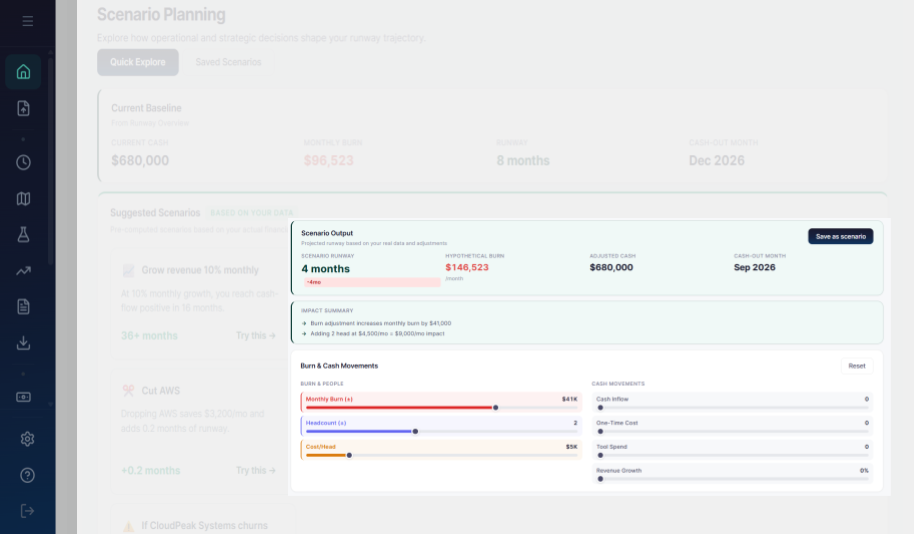
Your actual numbers, with one variable changed.
Traditional scenario planning starts with a blank spreadsheet. You estimate your current position, then layer assumptions on top. If the baseline is wrong, every scenario is wrong. RunwayCal scenarios start from your live financial data. Your actual cash, actual burn, actual revenue, actual team. Then you change one variable and see the exact impact. The difference between "I think we can afford this hire" and "this hire costs us 1.6 months of runway" is the difference between guessing and knowing.
Hiring Impact
See how each new hire changes your runway. Planned hires appear in purple across your financial model.
Revenue Modeling
Cohort-based retention modeling. New, expansion, contraction, and churned MRR computed monthly.
Budget vs Actual
Set budgets by category. Track variance automatically. See where you are overspending or underspending.
What you can model
Hiring Scenarios
Add planned hires and see payroll impact on runway instantly. Compare hiring 2 engineers now versus staggering over 3 months. See the burn trajectory change with each configuration.
Revenue Modeling
Adjust revenue growth rate and see how quickly you reach cash-flow positive. Test what happens if your biggest client churns. Model MRR expansion and contraction scenarios.
Expansion Planning
What happens if you open another location or add a product line? Model the additional burn against projected revenue. See whether expansion extends or compresses your runway.
Capital Strategy
Model a funding round. See how dilution affects ownership and how the new capital extends runway. Compare raising $500K now versus $1M in 6 months.
What you get at every tier
| Capability | Free | Pro $29/mo | Growth $149/mo |
|---|---|---|---|
| View scenarios | Preview | ||
| Create scenarios | upgrade | ||
| Scenario overlays on MC | upgrade | ||
| Revenue model scenarios | |||
| Multi-location scenarios |
Decisions are expensive. Testing them is free.
Free to start. No credit card required.
Related terms:Scenario Planning·What-If Analysis·Runway·Burn Rate