
Plan growth without guessing the impact.
Three planning sub-modules in one connected system: revenue modeling, budgeting, and hiring plans. Every plan updates your runway calculation automatically so you see the financial impact of decisions before you commit.
- Revenue modeling
- Budget tracking
- Hiring plans
- Runway-connected
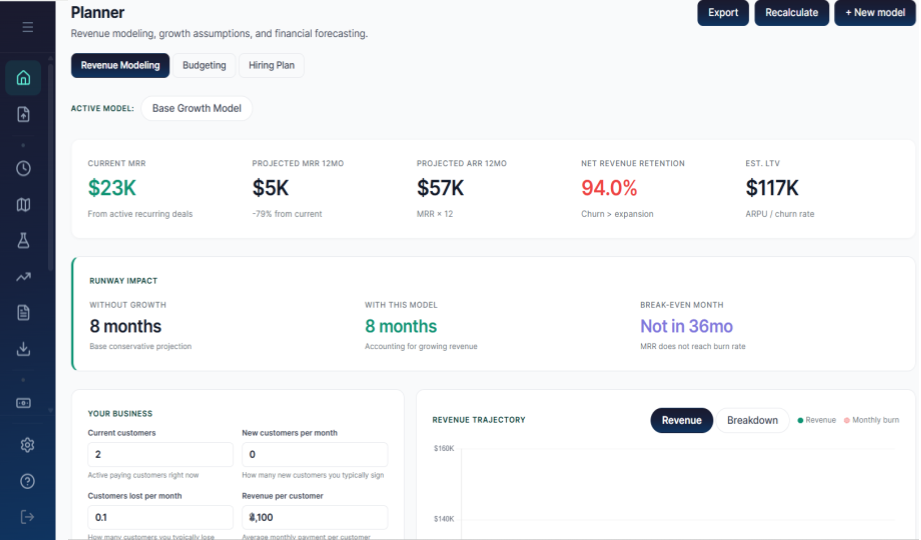
Every plan changes your runway. See how.
Add a revenue model, set budgets, or plan hires. RunwayCal instantly shows how each decision affects your cash trajectory.
What you can plan
Revenue Modeling
Model MRR growth with base MRR, growth rate, and churn rate. The MRR waterfall shows new, expansion, churn, and net movement. A month-by-month revenue projection table keeps the math visible, and the runway impact card shows how revenue growth extends runway. Forecast vs actual charts overlay projected MRR on actual MRR from monthly snapshots.
Budgeting
Create budgets with line items by category: payroll, tools, commitments, revenue, and funding. Budget vs actual variance analysis lists every line with severity-colored rows. Critical above 25%, warning above 10%, on track at 10% or below. Inline variance notes capture context per line and persist with the budget. Drill-down modals inspect actual transactions behind each variance.
Hiring Plans
Plan future hires with role, department, start date, and projected salary. The runway impact of planned hires compares current runway to adjusted runway with every planned hire applied, respects staggered start dates, and charts monthly burn trajectory with the incremental cost from hires layered in. The hiring timeline shows start dates, department badges, and monthly cost.
What you get at every tier
| Capability | Free | Pro $29/mo | Growth $149/mo |
|---|---|---|---|
| Revenue modeling | upgrade | ||
| Budgeting | upgrade | ||
| Budget vs actual variance | |||
| Hiring plan | |||
| Department forecasting | |||
| Multi-location planning |
Growth without a plan is just spending.
Free to start. No credit card required.
Related terms:Revenue Model·Budget·Hiring Plan·Cohort Retention